

RF Online 2.1.5 · the original sci-fi MMORPG, free, English and Russian client
Play freeGame systems
Storage
Storage
You can carry weapons, sets of armour, ore mined in the pit, trophies and money in five bags that hold up to 100 items. If you go over that, though, do not rush off to a vendor to sell something you do not need right now just to free up space. The Banker NPC in your race's headquarters can help. From them you can buy storage, expandable as you need it, to keep the things that may come in useful later but are in the way today.
Setting up storage
Storage is bought once and works for every character on the account, on one server. If you start playing on a new server you have to set storage up again. If you change race, the things left there by the other race are not available to you, although the storage itself remains.
Step 1: buying it
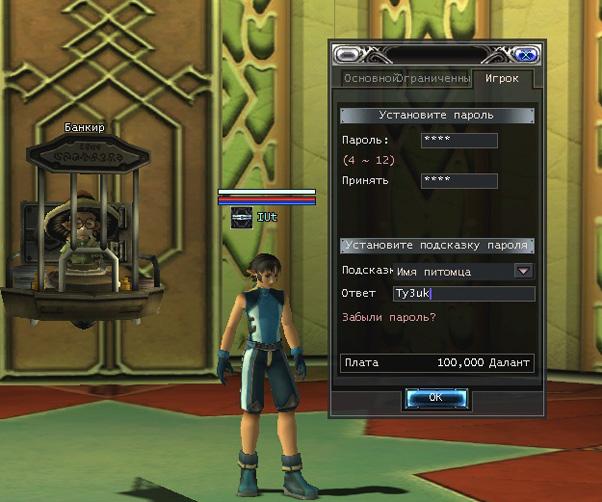
Every race's headquarters has a Banker NPC. Once you have found them, click them and choose Buy storage from the menu. The initial deposit is 100,000 of your race's currency, and you get one storage of 20 slots. You set your own password, and a hint for when you forget it.
Step 2: signing in
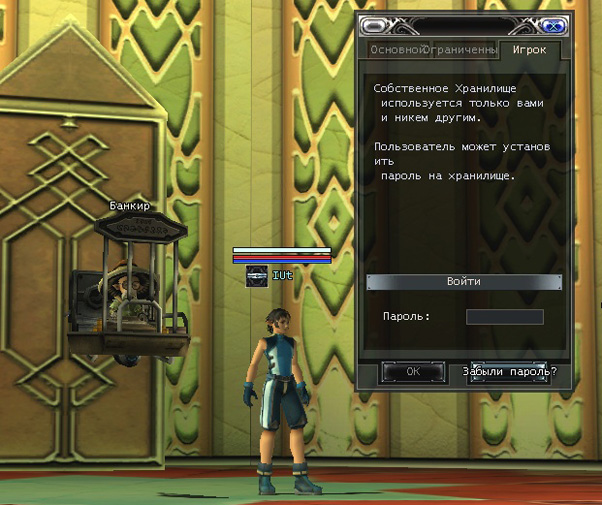
Press Use storage and enter the password you set when you created it. Enter the wrong password and you cannot use the storage.
Careful. If you have forgotten the password, or want to change it, press Forgot password?, answer your hint question and you will be given the password. To change it, press Change password and enter a new one.
Step 3: using it
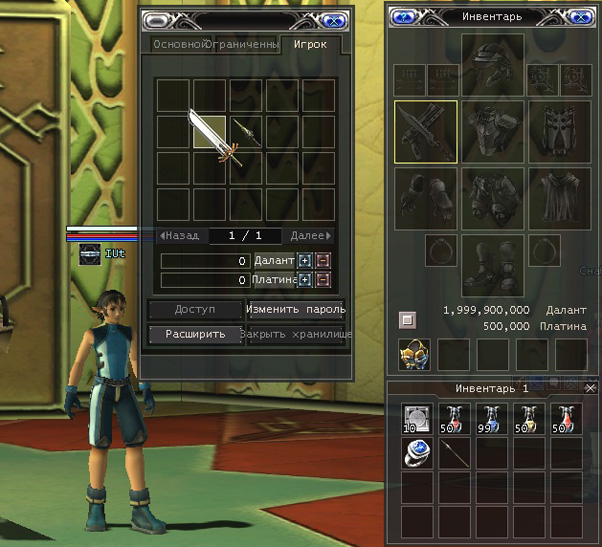
Once you are through, the storage inventory opens and works just like your ordinary inventory. Putting an item in is free, but taking something out costs a commission of 5% of the item's base price. Leaving or taking money, platinum or race currency, carries no commission.
Try it in the game
This guide comes from the original RF Online. The same game runs here as version 2.1.5, free, on Windows and Mac.
Source: rfonline.ru (Innova, 2007–2009), recovered from the Internet Archive. original page