

RF Online 2.1.5 · the original sci-fi MMORPG, free, English and Russian client
Play freeGame systems
Creating and running a guild
What is a guild in RF Online?
A guild is a community of players who have joined together to reach a shared goal. Those goals vary widely, from doing quests and hunting monsters together to forming alliances and military pacts aimed at dominating the server. Taking part in guild life builds friendships not only in the game but outside it.
The founders
Applying to create a guild takes a party of 8 people who have taken a specialisation, so level 30 or above. Those 8 become the founders. Creating a guild costs 24,000,000 in race currency.
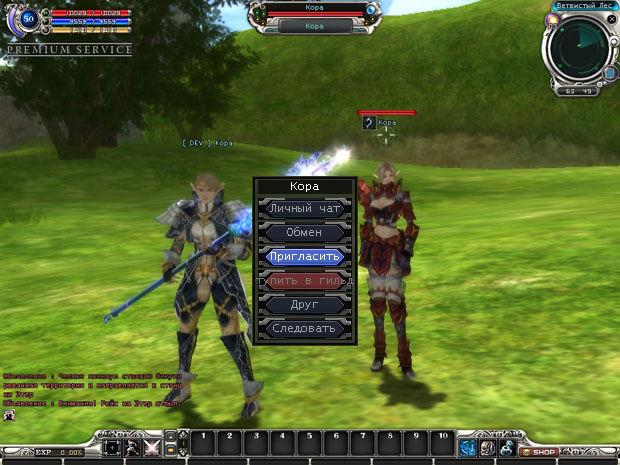
To create a guild, walk up to the Clerk NPC, press the found-a-guild button and enter the name you want. If it succeeds, the guild's name appears above the names of every character in it.
Joining a guild
If you want to join a particular guild you have to apply in person.
Step 1
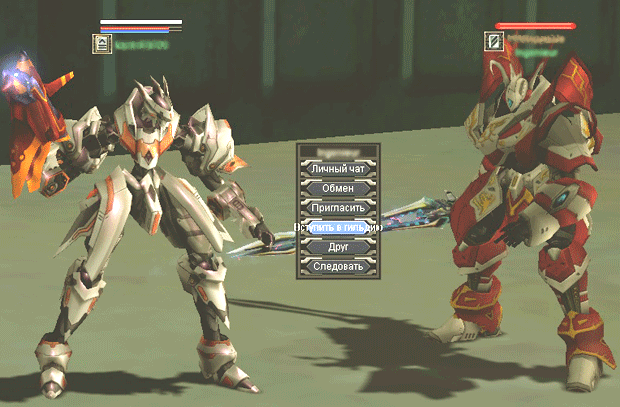
To join a guild you need to find a player who is already in it, then hold Ctrl and right-click them and choose Join guild from the menu.
Careful. If nobody from the guild you want is in sight, you can still apply: open the guild menu with G or Ctrl+G and type the name of the guild you want.
Step 2
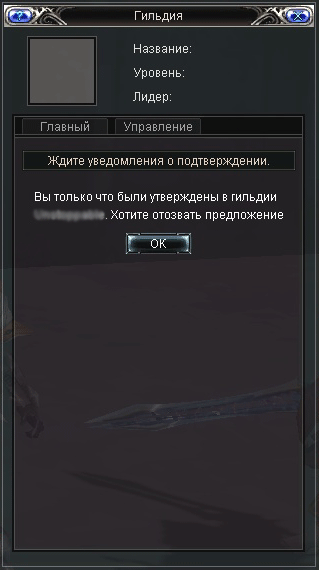
Once an application is sent, the guild interface (G or Ctrl+G) shows that it is being processed. The guild's own members see a list of players waiting to be admitted.
Step 3
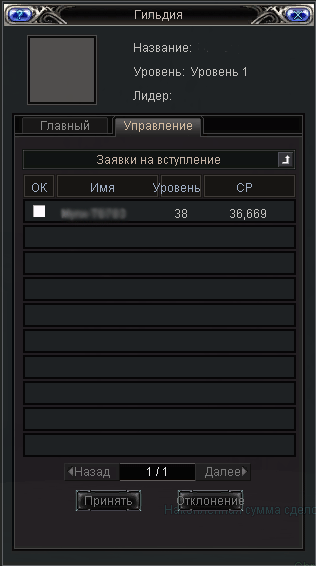
The founders and the guild council decide whether to admit a player. If they agree, the player joins.
What else a guild leader can do
The guild leader's mark. Hold Ctrl and click a character of another race, or a monster, and a yellow arrow appears above them; a target marked this way also shows on the radar. If the target is off screen, its direction shows as a yellow arrow on the radar. Visible to guild members only. One person can hold the powers of party leader, guild leader and race leader at the same time. Available to the guild leader only.
Marking a route. Alt and right-click on the map places yellow flags. There is a 360 second cooldown, and the flags are visible only to your own guild.
From rank 3 onward the guild leader's attack and defence rise by 5% with every rank.
The guild leader's greeting. The leader can write a greeting that every guild member sees when they log in.
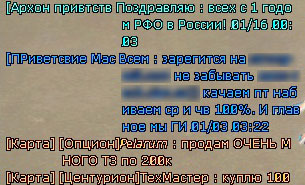
The command is $Guild Guild_leader greeting, available to the guild leader only. As the example shows, the message appears at every login in the form [Greeting text].
The guild interface

1. The guild emblem.
2. Guild information: name, rank and leader.
3. Guild administration.
4. The general menu, open to every member: information about the members; the notice board, for founders and the council only; guild funds, where the guild account can be topped up; records of guild-versus-guild battles; the forum; storage; and leaving the guild.
5. The management menu, open to the founders and the council only:
Admissions, deciding on players who have applied.
Items for a vote: declaring a guild war; removing a member; spending guild funds on a particular need; electing the guild master; and buying an emblem.
Income and spending, for checking money in and out of the guild.
Try it in the game
This guide comes from the original RF Online. The same game runs here as version 2.1.5, free, on Windows and Mac.
Source: rfonline.ru (Innova, 2007–2009), recovered from the Internet Archive. original page