
RF Online 2.1.5 · the original sci-fi MMORPG, free, English and Russian client
Play freeGame systems
Macros
What are macros?
A macro is a tool that carries out a set of actions for you. Macros make it easier for your character to use skills, chat and so on.
Open the macro panel with Y or Ctrl+Y, or by choosing Macros in the game system menu.
Auto item
On the auto item tab you can set potions for HP, FP and SP to be used automatically once those values on your character fall to a threshold you choose.
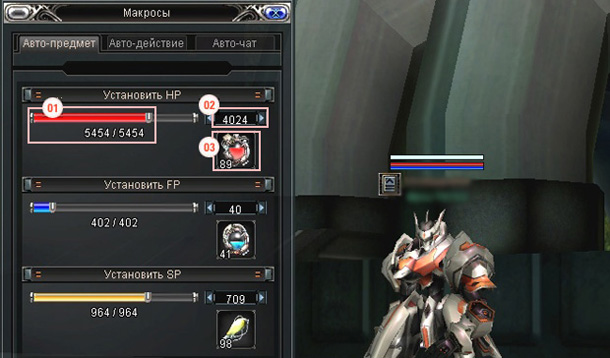
1. The slider showing the current and maximum value of the stat. Moving it changes the threshold at point 2.
2. The threshold at which the item in slot 3 is used.
3. The item that raises the stat, which has to be in your inventory.
Careful. Keep an eye on whether you still have the HP, FP and SP items in your inventory.
Auto action
Auto action is a special command that carries out several actions, skills, Force and so on, automatically when you right-click its icon.
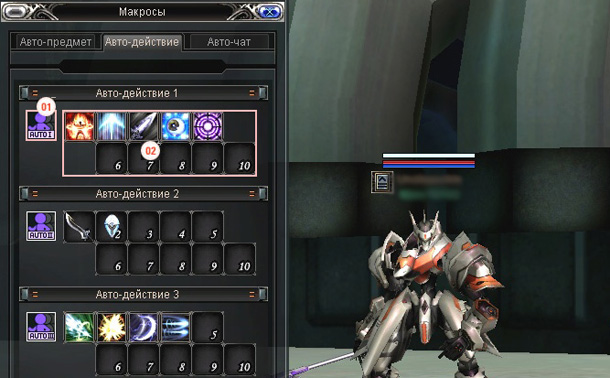
1. Setup: drag the icons of the actions you want into these slots.
2. Right-clicking this icon runs the actions you placed in the slots. You can drag this icon onto a quick-launch slot to make it easier to reach.
How to arrange them
Items, meaning weapons and armour: whatever you want to use. Skills and Force: attacking and negative Force. Skills and Force: positive Force.
Auto chat
You have two chat groups, each holding up to five lines.
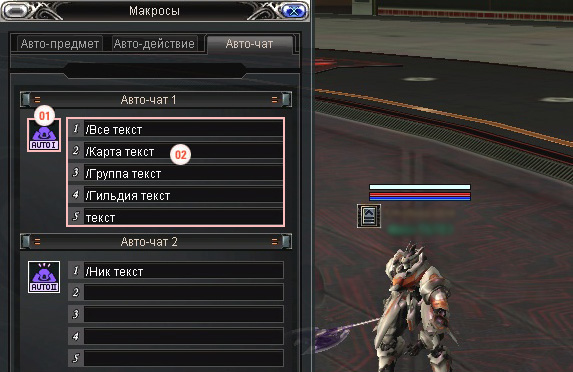
1. Right-clicking the auto chat icon sends the messages you entered in the five lines.
2. Setup: type the text that will be sent to chat.
Try it in the game
This guide comes from the original RF Online. The same game runs here as version 2.1.5, free, on Windows and Mac.
Source: rfonline.ru (Innova, 2007–2009), recovered from the Internet Archive. original page